service printer

service printer
hp,epson,canon,xerox,samsung,brother dan dot matrik.dll.

Rabu, 24 Januari 2018

error printer brother

Kode Error Pada Printer Brother Dan Solusinya

Tentu Anda sebagai pengguna printer tidak pernah luput dari Pesan atau Kode Error pada layar display printer Anda ataupun layar komputer Anda. Entah itu kertas nyangkut, tinta habis, ataupun masalah yang lebih berat lainnya seperti print head rusak, cartridge tidak terbaca, dan lain-lain. Nah, untuk printer Brother, kami akan membagikan arti dari kode-kode error tersebut melalui artikel ini, dan semoga dapat bermanfaat dalam menanggapi masalah pada saat penggunaan printer Brother Anda. Biasanya kode-kode error tersebut di mulai dengan kata-kata seperti: unable to print XX, unable to init XX.


Error Pada Laser Printer Brother Series


Sering kali kita menemukan error pada printer Brother laser kita, dan sering kali kita hanya menyerahkannya pada bagian teknisi, padahal ada beberapa error yang bisa kita tangani sendiri dengan mengetahuin sumber penyebab dari error tersebut.


Solusi untuk Error pada printer laser Brother
Printer Laser  Brother

Kali ini saya mau berbagi beberapa error dan deskripsi dari error tersebut, yang akan saya jabarkan dalam gambar table nantinya. Penyebab error sebenarnya dikarnakan ada bagian dari mekanik atau sensor dari printer laser tersebut yang tidak bekerja dengan baik atau malah tidak berfungsi. Kadangkala printer tersebut hanya perlu dibersihkan sensornya yang terdapat pada bagian-bagian tertentu, secara sepintas memang nampak sulit, tetapi secara teknis sebenarnya tidak lah sulit hanya perlu kita ketahui beberapa fungsi dan bagian nya saja.
Berikut adalah gambar table beberapa error dan deskripsi nya :


Dan ini kode error untuk Sesor pada Laser Printer Brother :


Untuk kali ini sekian dulu pembahasan kita, jika ada sesuatu yang belum jelas dan mau ditanyakan silahkan meninggalkan komentar ada dibawah atau bisa menghubungi kami dikontak.
Semoga bermanfaat........!


Selasa, 23 Januari 2018

error printer hp laser jet

 CODE ERROR PRINTER HP LASER JET 


HP LaserJet Pro, Ultra M130-M134 Printers - Blinking Lights

This document is for the HP LaserJet Pro MFP M130a, M132a, and LaserJet Ultra MFP M134a printers.
The following sections describe the most common error conditions with combinations of blinking (flashing) lights displayed on the printer control panel, followed by solutions for each combination. Find the blinking light pattern that displays on the control panel, and then follow the steps to resolve the issue.

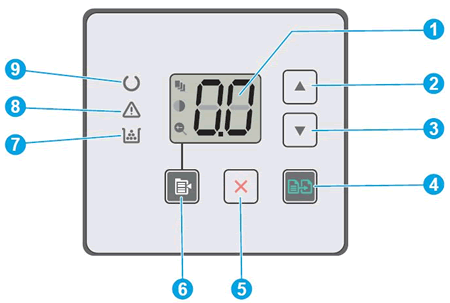
    Figure : Control panel buttons, icons, and lights
    Image: Example of the control panel buttons, icons, and lights
  1. Control panel LED display
  2. Up arrow button
  3. Down arrow button
  4. Start Copy button
  5. Cancel button
  6. Copy Setup button
  7. Supplies light
  8. Attention light
  9. Ready light
Er/11 to Er/19 displays, and the Attention and Supplies lights blink
The errors might display for the following reasons:
  • Er/11, Er/14, or Er/17: The toner cartridge is not compatible with the printer, has been protected on another printer, or is an unauthorized toner cartridge.
  • Er/12, Er/15, or Er/18: The imaging drum is not compatible with the printer, has been protected on another printer, or is an unauthorized imaging drum.
  • Er/13, Er/16, or Er/19: Both the toner cartridge and imaging drum are not compatible with the printer, have been protected on another printer, or are unauthorized supplies.
Replace the affected supplies.
Figure : The Attention and Supplies lights are blinking
The Attention and Toner-Level lights are blinking
Visit HP SureSupply to check ink or toner cartridge compatibility or purchase replacement cartridges and other supplies.
  1. Go to HP SureSupply.
  2. If necessary, select your country/region.
    Figure : Country/region selector
    Selecting your country/region
  3. Follow the on-screen instructions to order new supplies or check cartridge compatibility with your printer.
You can also purchase genuine HP cartridges and supplies from other retailers.
Step 1: Replace the incompatible toner cartridge
Replace the toner cartridge with a new toner cartridge and try to print. If the error persists, continue to the next step. For more detailed information, go to Replacing the Toner Cartridge.
Step 2: Replace the incompatible imaging drum
Replace the imaging drum with a new imaging drum and try to print. If the error persists, continue to the next step. For more detailed information, go to Replacing the Imaging Drum.
If you have completed all the previous steps and the issue persists, continue to the Service the printer section at the end of this document.
Er/20 displays, and the Attention and Supplies lights blink
An Er/20 error message indicates an error with the toner cartridge sensor.
Figure : The Attention and Supplies lights are blinking
The Attention and Toner-Level lights are blinking
Step 1: Replace the toner cartridge
To replace a missing or old toner cartridge, open the scanner assembly and top cover, remove the old toner cartridge, and then install a new one. For more detailed information, go to Replacing the Toner Cartridge.
If you have completed all the previous steps and the issue persists, continue to the Service the printer section at the end of this document.
Er/81 displays on the control panel and the Attention light blinks
This condition indicates that the incorrect firmware is loaded.
Load the correct firmware. For detailed information on downloading and installing the firmware, go to Getting the Latest Firmware and Product Updates.

Featured Post

error printer brother

Kode Error Pada Printer Brother Dan Solusinya Tentu Anda sebagai pengguna printer tidak pernah luput dari Pesan atau Kode Error pada laya...